Dashboard
Updated 20 November 2026
Quick answer
The dashboard is the first screen after signing in. Admin and office staff see leads, open quotes, outstanding invoices, invoiced value, follow-ups due, AMC renewals and upcoming site visits. Field staff see only their own upcoming site visits and jobs. Every figure links to the list behind it.
The dashboard is the first screen everyone sees after signing in. It is built to answer one question at the start of the day: what needs attention now? Like the rest of this field service software, what you see depends on your role.
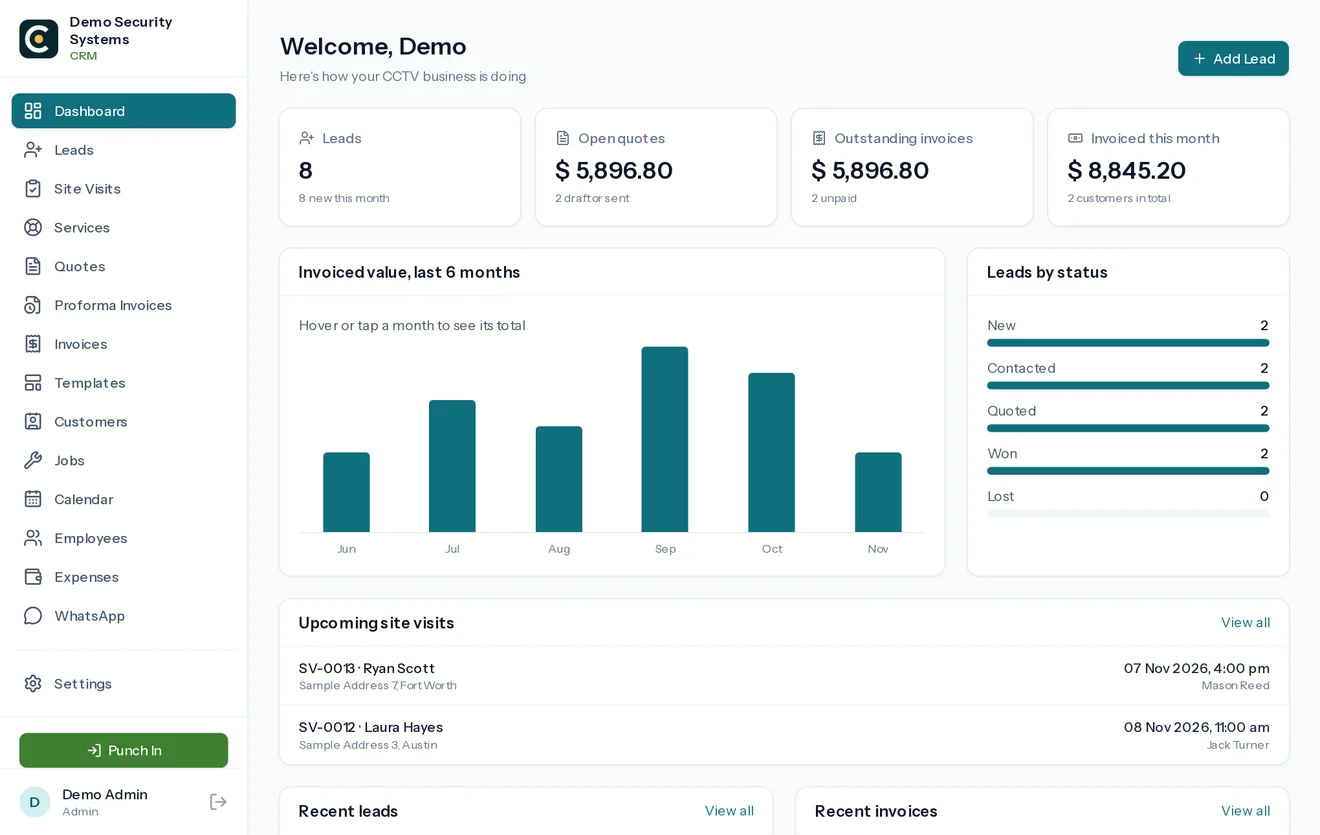
The office and admin dashboard
Figures at the top
| Tile | What it shows | Click it to open |
|---|---|---|
| Leads | All leads, and how many arrived this month | The lead list |
| Open quotes | The value of quotes still in Draft or Sent, and how many | The quote list |
| Outstanding invoices | The money still owed on unpaid and part-paid invoices, and how many | Unpaid invoices |
| Invoiced this month | The value invoiced this month, and your total number of customers | The invoice list |
The three money tiles appear only for people allowed to see figures: admins, office staff, and your own roles given "dashboard financials".
Charts
- Invoiced value, last 6 months: a bar for each month. Hover over a bar to see the amount.
- Leads by status: how many leads are New, Contacted, Quoted, Won and Lost. A long New column means enquiries are waiting for a reply.
Lists that need action
- Follow-ups due: leads whose follow-up date is today or earlier. Your own leads come first, and overdue ones are shown in red. Click a lead to open it.
- AMC renewals due: maintenance contracts ending in the next 30 days, or ended in the last 30 days without renewal.
- Upcoming site visits: the next surveys booked, with the contact, site, date and time, and the engineer.
- Recent leads and Recent invoices: the latest of each, with View all to open the full list.
The Add Lead button at the top opens Leads, ready to add a new enquiry.
The field staff dashboard
Technicians see a simpler screen with only their own work:
- Upcoming site visits assigned to them, with All my visits to see the rest.
- My jobs: their jobs with each one's status, and All jobs to open the list.
Field staff never see prices, invoices or other people's work on the dashboard.
A five-minute morning routine
- Clear Follow-ups due: call each customer, then set the next date or mark the lead Won or Lost.
- Check Outstanding invoices and send reminders for anything past due.
- Look at Upcoming site visits and make sure every engineer has the address and brief.
- Start renewal calls for anything under AMC renewals due.
Frequently asked questions
Why can't some staff see the money figures on the dashboard?
Open quotes, outstanding invoices and invoiced value are shown only to roles allowed to see financial figures. Admins and office staff can; field staff cannot. Admins can give or remove this for their own roles in Settings → Roles.
What counts as an outstanding invoice?
Any invoice that is Unpaid or Partially Paid. The figure is the balance still owed after the payments recorded.
Does the dashboard show technicians' work?
Each technician sees their own upcoming site visits and jobs. Admin and office staff see the whole team's schedule on the calendar.
Want a walkthrough? We can show you these screens using a job like yours.