For RO and water purifier dealers, installers and service businesses
RO and water purifier installation business software for dealers and service teams
A water purifier business lives on service: every purifier you sell needs filters changed, membranes replaced and complaints attended for years. CamVerion keeps every customer's purifier, every AMC visit and every service call in one place, with your technicians tracked on their phones.
Plans from $49 a month for up to 10 users. Every feature on every plan.
The sale is one visit. The service is years of them
Most RO businesses sell and install a purifier in a day, then look after it for five years or more. Filter changes are due every few months, AMCs need renewing every year, and complaints about taste, leaks or low flow arrive every day. When all of this is in a notebook and the technicians' phones, visits are missed and renewals slip away to the next dealer.
Water purifier service business software keeps each customer's purifier and contract on one record. Planned visits are created from each AMC, complaints become service calls with a technician and a status, and the office can see which renewals are due this month.
One flow, from first call to final payment
Each stage creates what the next one needs, so nothing is typed twice.
-
Step 1
Enquiry
Log purifier enquiries from calls, WhatsApp and walk-ins as leads with a follow-up date.
How it works -
Step 2
Site check
A technician checks the water source, TDS and fitting position before you quote.
How it works -
Step 3
Quote
Send a quote for the purifier, fitting and an AMC plan as a PDF on WhatsApp.
How it works -
Step 4
Installation
The approved order creates the installation job for the technician who will fit it.
How it works -
Step 5
Scheduling
Book installations and service visits into each technician's free slots.
How it works -
Step 6
Invoice
Invoice the purifier and installation without retyping, with your tax on every line.
How it works -
Step 7
AMC
Create the AMC, and each filter-change visit is raised as a service call when due.
How it works -
Step 8
Complaints
Leaks, bad taste and low flow are logged, assigned and followed to the end.
How it works
Service every purifier on time
Complaints and AMC visits with a clear owner
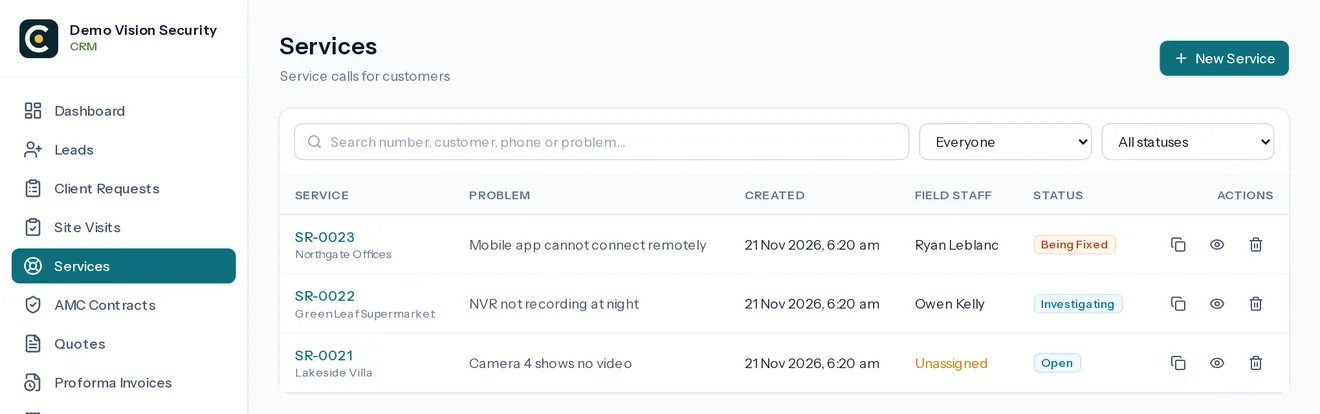
Every complaint and planned filter change becomes a service call with the customer's address, Google Maps location and history. A technician claims it, updates the stage and records parts and charges, and the customer gets a receipt.
- Clear stages from Open to Issue Resolved
- Filters, membranes and charges recorded on the call
- A receipt or tax invoice when the call is done
Never lose an enquiry
Every purifier enquiry has a next step
Enquiries arrive from calls, WhatsApp, walk-ins and old customers moving house. Each one is a lead with a source and a follow-up date, so the dashboard shows who to call today.
- Add a WhatsApp Web chat as a lead in one click
- Follow-up dates and a list of follow-ups due
- Lost reasons recorded, so you learn what loses sales
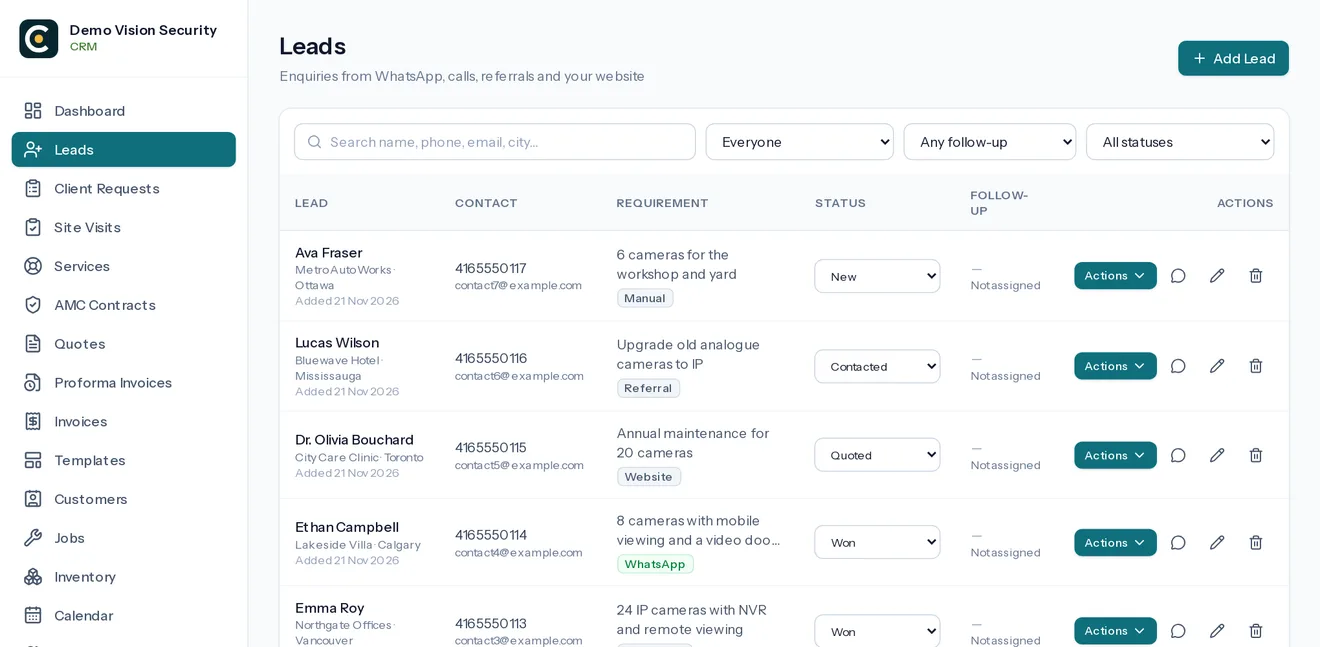
Screens are from the real software, with made-up demo data.
Everything your water purifier business uses day to day
-
Enquiries and follow-ups
Purifier enquiries from calls, WhatsApp and walk-ins, each with a follow-up date.
-
Site checks
Water source, TDS and fitting position noted before you quote.
-
Quotes with AMC plans
Purifier, fitting and AMC priced together and sent on WhatsApp.
-
Installation jobs
Each order creates the installation job for a technician.
-
Technician scheduling
Installations and service visits booked into free slots.
-
Complaint handling
Leaks, taste and low flow complaints followed to the end.
-
AMC and filter changes
Planned visits created from each AMC, and renewals listed.
-
Service request link
Customers book service themselves, with their location.
-
Field staff tracking
Punch in, Capture Location at each home, and the Locations report.
-
Time per call
Start Work and End Work show how long each call took.
-
Stock of filters and spares
Optional inventory of purifiers, filters, membranes and spares.
-
Receipts and invoices
A receipt or tax invoice for every call, and payments recorded.
Field team tracking
Know where your service technicians are, and the hours they really worked
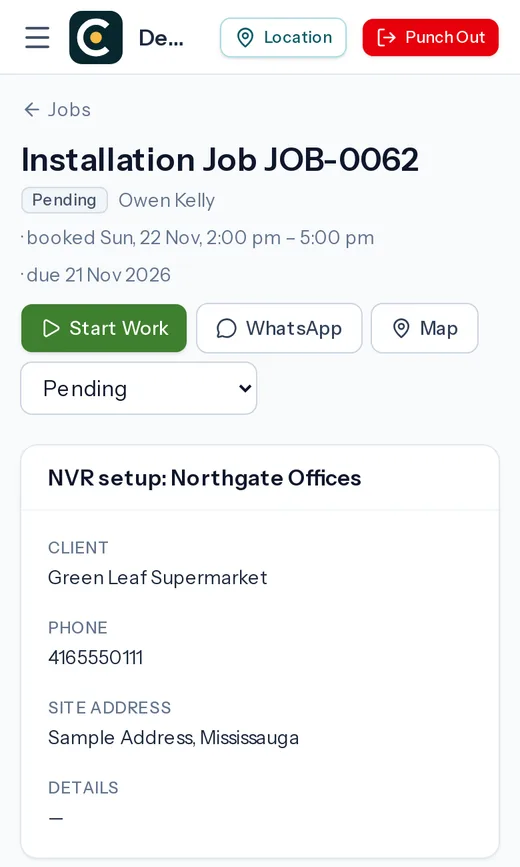
A purifier service technician can attend eight or ten homes a day. With punch in, Capture Location at each home and Start Work on each call, you know which customers were really visited, how long each call took, and which complaints are still open.
-
Capture Location
Your service technicians press Capture Location on their phone, and the office sees where they were and when on the Locations report. Ask them to capture it at every client, or every hour, so you can check visits at random instead of phoning around. -
Punch in and out with location
Attendance starts with a punch in that records the time and place, and ends with a punch out. A forgotten punch out closes automatically at the end of the day, so the attendance report is ready for payroll. -
Start Work and End Work on each job
Pressing Start Work on a job or service call starts the clock and End Work stops it. Admins see the hours each person spent on each job, so you can price the next one properly and spot hours that were claimed but not worked. -
Approve new device login
Switch it on, and each person can sign in only from their one approved phone or computer. A login from any other device waits for the admin's approval, so logins are not shared and attendance is marked by the right person. Choose field staff only, or everyone except admins.
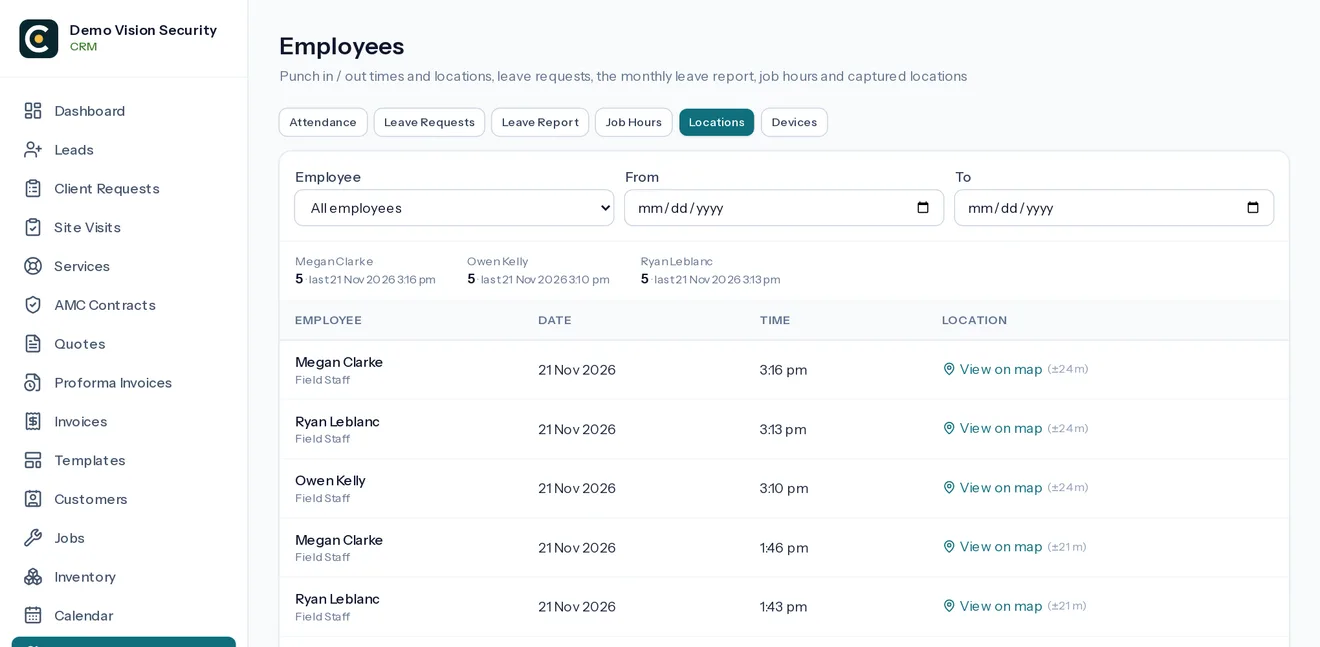
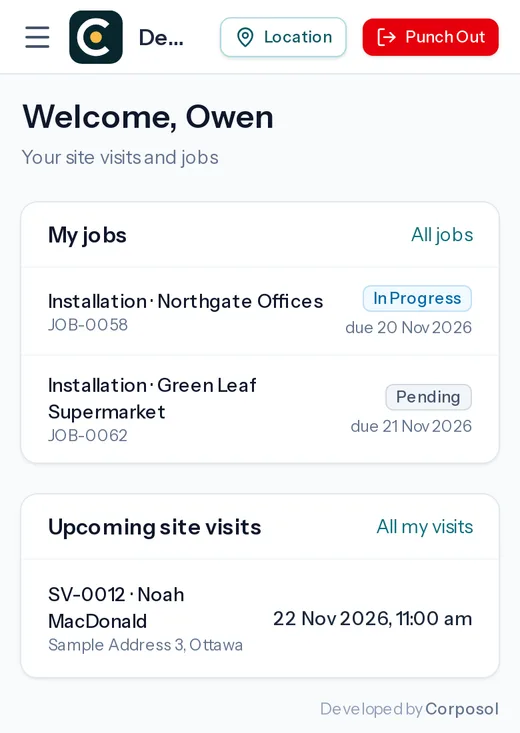
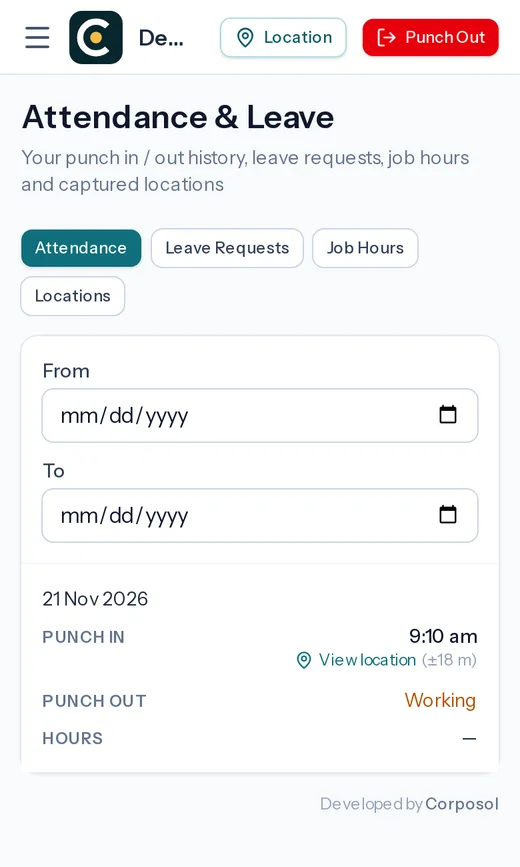
Locations are taken only when staff punch or press Capture Location, never in the background. How field staff tracking works
Built for field teams
Technicians see their calls, not your prices
Technicians open the day's installations and service calls on their phone with the address, map and problem. They punch in, add photos and record parts used. Prices, margins and accounts stay with the office.
How roles workOnline service request form
Clients raise water purifier service requests themselves
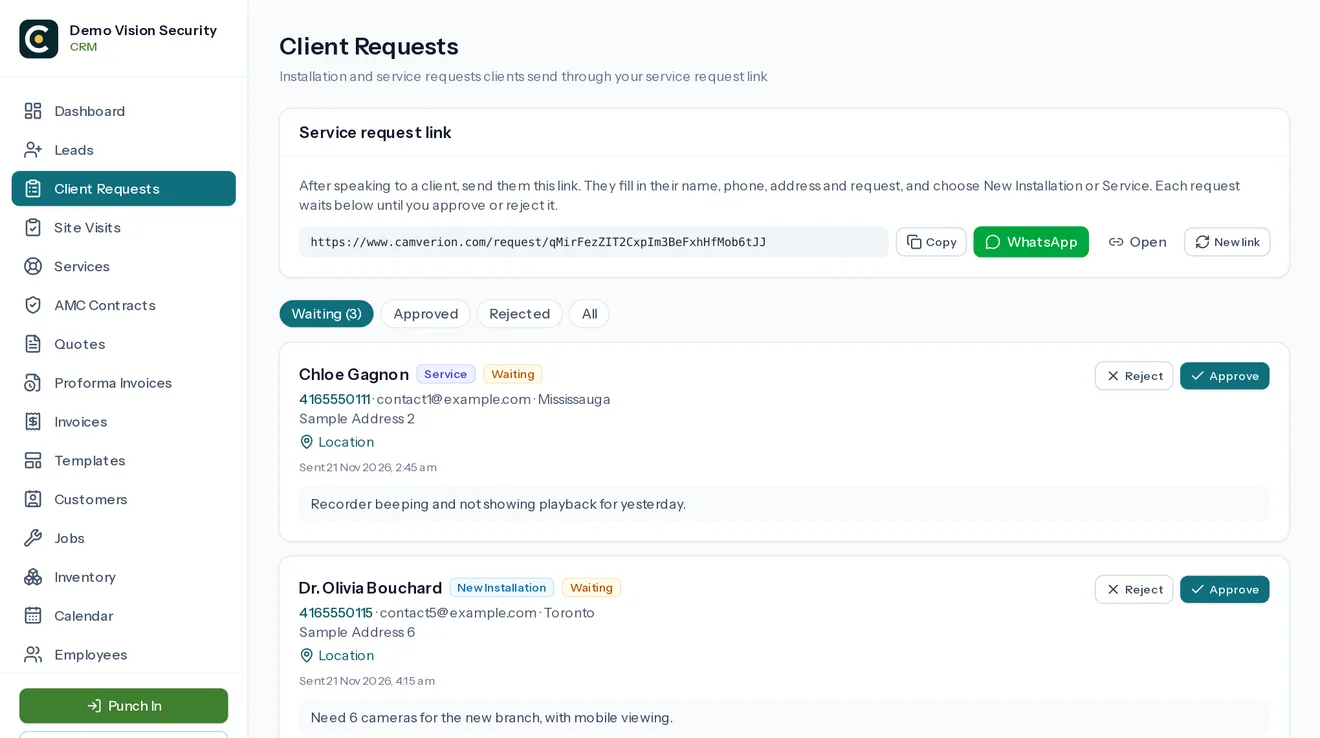
Customers call about leaks, bad taste and low flow every day. Send them your service request link: they describe the complaint, paste their Google Maps location, and the request waits for you to approve it into a service call.
- Your own link and form with your company name and logo
- Google Maps location required, so the technician goes straight to the site
- Approve a new installation into Leads, or a fault into Leads and Services in one click
- Every admin is emailed from your own company mailbox, once you add it
- Reject spam without it ever reaching your leads
Inventory, when you want it
Stock that is charged to the job that used it
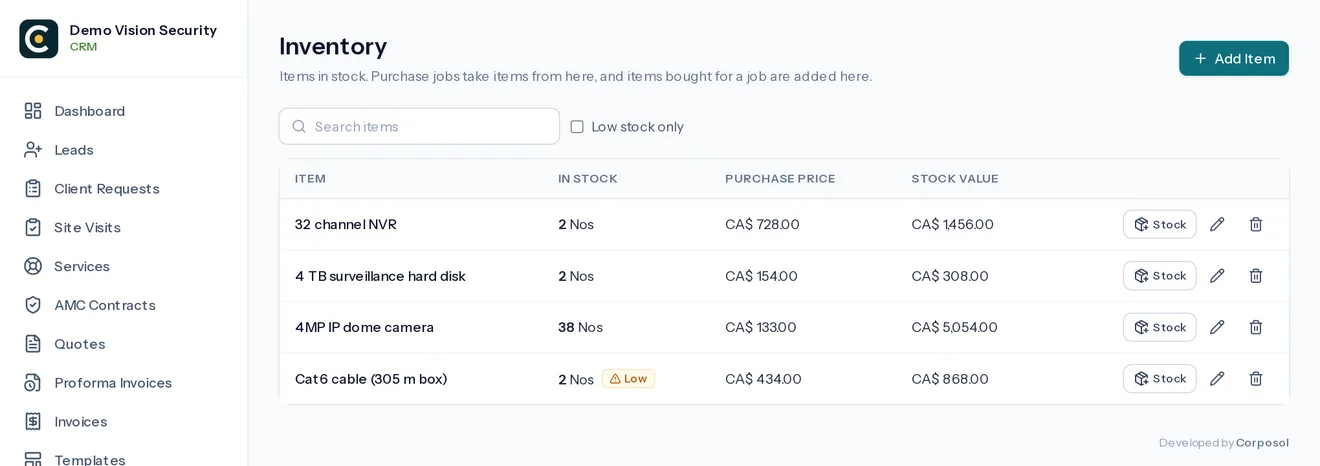
Switch on Inventory to keep purifiers, sediment and carbon filters, membranes, pumps and spares in stock. Installations take what they need, technicians record what they used, and low-stock warnings tell you when to reorder filters.
- Stock bought and corrections after counting, each with a note
- Low stock warnings for the items you use on every job
- Items taken from stock or bought new on each purchase job
- Unused items go back into stock when the installer records what was used
- Off by default: companies that do not hold stock never see it
A purifier customer, from the first call to the third AMC renewal
How a typical RO customer moves through the software.
-
1. Enquiry
A family asks on WhatsApp for an RO purifier. You add the chat as a lead with a follow-up.
-
2. Site check
A technician checks the water TDS and the fitting position, and captures the location.
-
3. Quote
You send a quote for the purifier, fitting and a yearly AMC with three filter changes.
-
4. Installation
The order creates the installation job. The purifier comes out of stock; the technician presses Start Work.
-
5. AMC visits
The AMC raises each filter-change visit as a service call before it is due.
-
6. Complaint and renewal
A leak is reported through your link and fixed the same day. A month before the AMC ends, it appears under renewals due.
A good fit for
Teams of about 2 to 50 people, with an office and staff working at customer sites. Every plan includes every feature.
- RO and water purifier dealers
- Water purifier service and AMC businesses
- Water softener and filtration plant installers
- Commercial RO plant service teams
- Authorised service partners of purifier brands
- Businesses that also service water heaters
- Dealers with walk-in showrooms and field technicians
- Teams of 2 to 50 people
Questions about ro water purifier installation and service business software
What is water purifier service business software?
Software that runs an RO and water purifier dealer or service business: enquiries, installations, AMC contracts with planned filter-change visits, complaints as service calls, technicians, receipts and invoices, in one system.
Can it remind us when a filter change is due?
Yes. Create an AMC with the visit interval, such as every 3 or 4 months, and each visit is raised as a service call before it is due. Contracts ending soon are listed for renewal.
Can customers book a purifier service online?
Yes. Send them your service request link. They describe the complaint and paste their Google Maps location, and you approve it into a service call.
Can I track my service technicians?
Yes. Technicians punch in with location, press Capture Location at each home and Start Work on each call. Admins see the Locations and Job Hours reports.
Can I keep stock of filters, membranes and purifiers?
Yes, with the optional Inventory module, which shows what is in stock and warns when an item is running low.
How much does it cost?
Plans start at $49 a month for up to 10 users, with a one-time setup fee. Every plan includes every feature.
Further reading for ro and water purifier business owners
Who it is for
Also built for these installation and service businesses
Different trades, the same journey: an enquiry, a site visit, a quote, the installation, the invoice and years of service. One field service management system runs it for all of them.
- CCTV installation software Surveys, multi-camera quotes, installation jobs and service calls. See how it works
- Security installation software Alarms, access control, intercoms and fire alarm work. See how it works
- Smart home installation software Smart home projects, room-by-room quotes and support. See how it works
- AC and HVAC installation software AC installations, service visits, AMCs and breakdown calls. See how it works
- RO water purifier installation software Purifier installations, filter changes, AMCs and service calls. See how it works
- Solar and inverter installation software Roof surveys, rooftop projects, inverters, batteries and O&M. See how it works
- AV installation business software Equipment quotes, AV projects, calibration and support. See how it works
- Network installation business software Structured cabling, Wi-Fi projects and support calls. See how it works
- Electrical contractor software Wiring projects, panels, EV chargers and maintenance call-outs. See how it works
- IT and computer service business software Computer AMCs, printer and laptop repairs, office IT support. See how it works
- Appliance repair business software Repair calls, warranty jobs, spare parts and service centres. See how it works
- All industries Can't find your industry? Tell us how you work, and we will set it up or build it for you. See all industries
Run your next installation job from one place
Sign up with your company details and pay online. Your account opens as soon as you have paid, and you can add your team.