Prices in AED

Field service management (FSM) software

Run your whole installation business. Not just the quote.

CCTV, security, AC and HVAC, RO purifier, solar, electrical, IT service and appliance repair businesses use CamVerion to take every job from the first enquiry and site survey to installation, invoice and years of service. It is installation business management software with the office and the technicians on one system, and you always know where your field team is and what they worked on.

Enquiry. Survey. Quote. Install. Invoice. Service.

Software for: CCTV installation software · Security installation software · Smart home installation software · AC and HVAC installation software · RO water purifier installation software · Solar and inverter installation software · AV installation business software · Network installation business software · Electrical contractor software · IT and computer service business software · Appliance repair business software
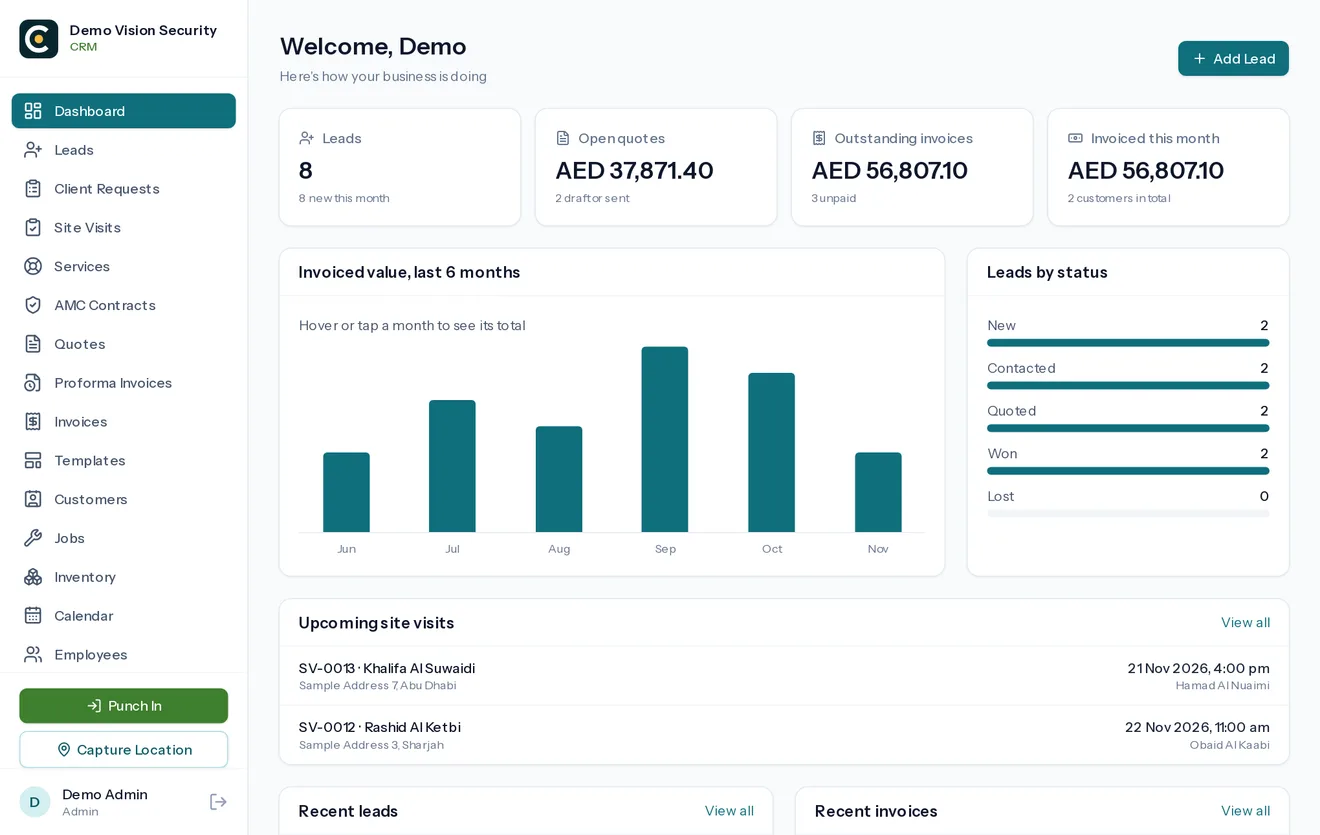
The dashboard, showing leads, open quotes, unpaid invoices and monthly sales
8
stages from enquiry to payment, on one record
3
staff roles, each with the right access
11
installation and service trades, from CCTV and AC to appliance repair
0
modules to add on: every plan has every feature

Set up for the UAE

  • Documents in AED with 5% VAT
  • Your TRN printed as the tax ID
  • UAE phone numbers and the Gulf time zone
  • Quotes and invoices sent from your own WhatsApp number

Who it is for

Built for companies that install, commission and service

Different trades, the same journey: an enquiry, a site visit, a quote, the installation, the invoice and years of service. One field service management system runs it for all of them.

How a job moves

One job, passed between your team without anything getting lost

Each step hands over to the next person. Nobody retypes details, and everyone can see where the job has reached.

  1. 1 LeadSaved from WhatsApp, a call or your websiteOffice
  2. 2 Site visitAssigned to an engineer, with notesField team
  3. 3 QuoteBuilt from templates, sent as a PDFOffice
  4. 4 ProformaJobs are created, then the owner approvesOwner
  5. 5 JobsInstalled, with photos and hoursField team
  6. 6 Sign-offFinished work is approvedOwner
  7. 7 InvoiceMade from the proforma, no retypingOffice
  8. 8 PaymentFull or part payments recordedOffice

After handover, service calls keep the customer's history in the same place.

Everything your installation business runs on

Screens below are from the real software, with made-up demo data.

Win the work

Every enquiry in one place

Every enquiry lands in one list, whether it came from WhatsApp, a phone call, your website or a referral.
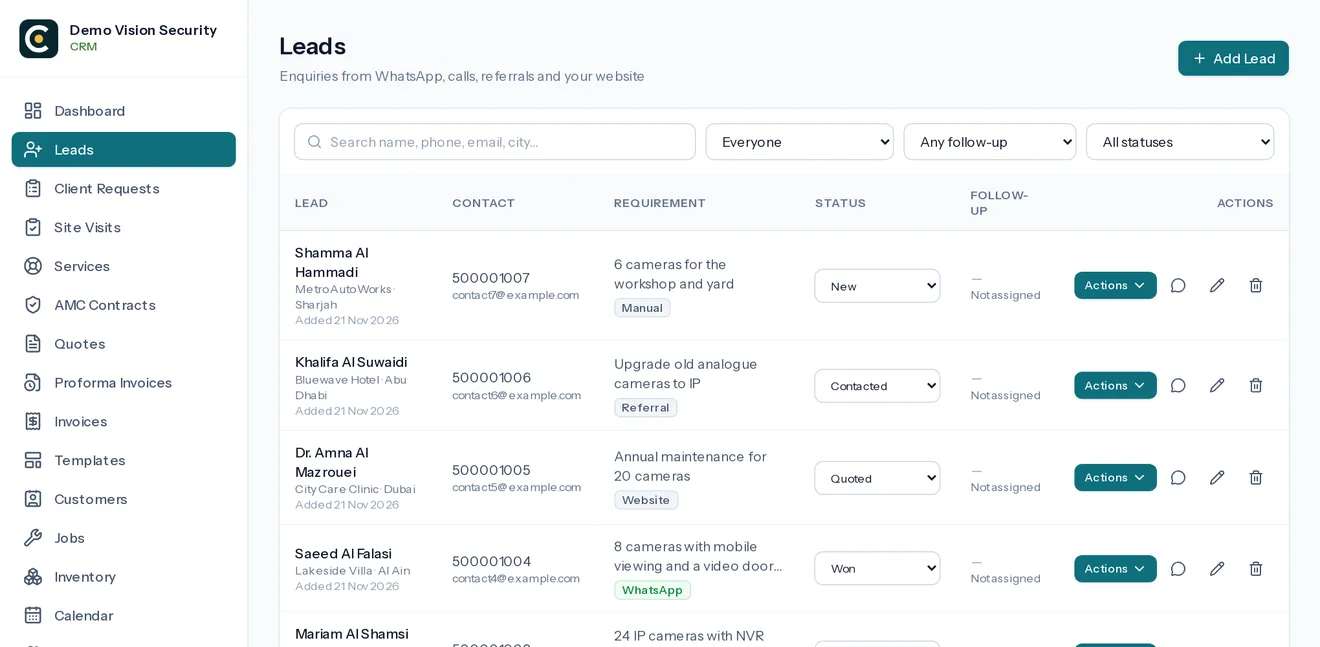
  • Track each lead by source and status
  • Add a WhatsApp Web chat as a lead in one click with the Chrome extension
  • Reply on WhatsApp from a saved template
The leads list, with source, status and requirement for each enquiry

Quote faster

Professional quotes, in minutes

Build quotes from reusable templates and your own item catalogue, then send a branded PDF straight from the screen.
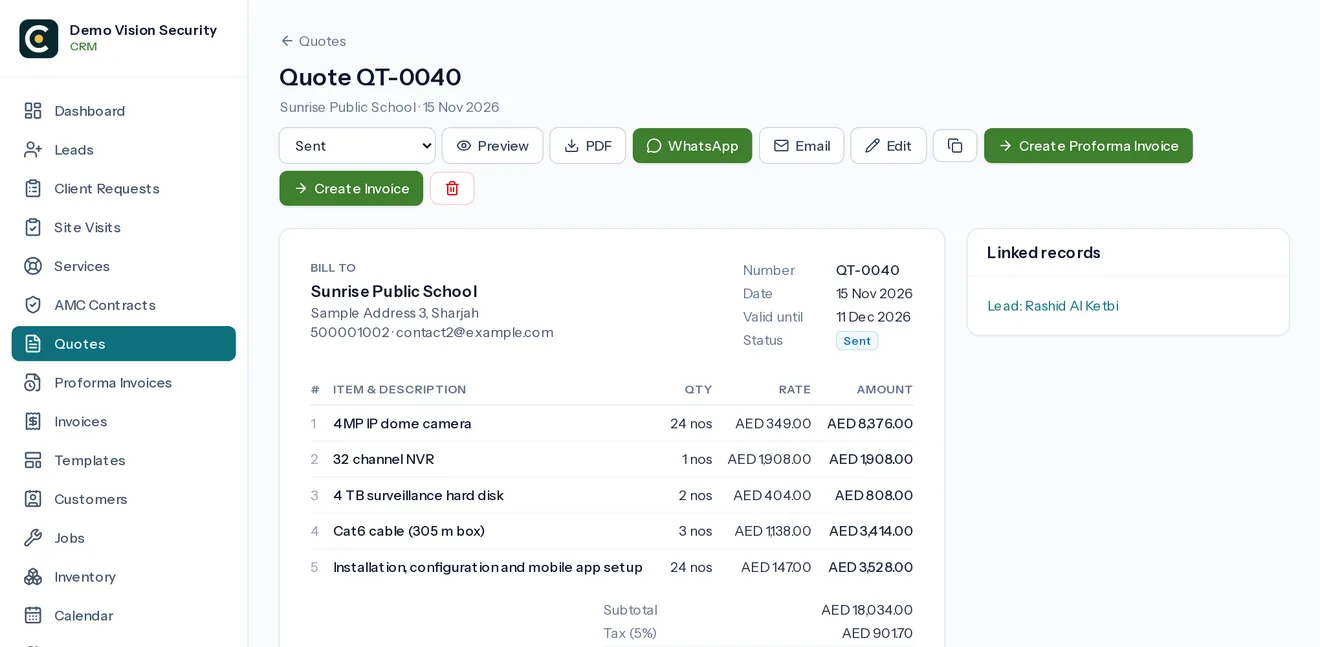
  • Your logo, signature and terms on the PDF
  • Send by WhatsApp, email or a secure link
  • Turn it into a proforma or invoice with one click
A quote with equipment, materials and installation, with buttons to send by WhatsApp or email

Plan the day

See who is free before you book

The calendar shows every employee's day, so you can book a job, service call or site visit into a free slot.
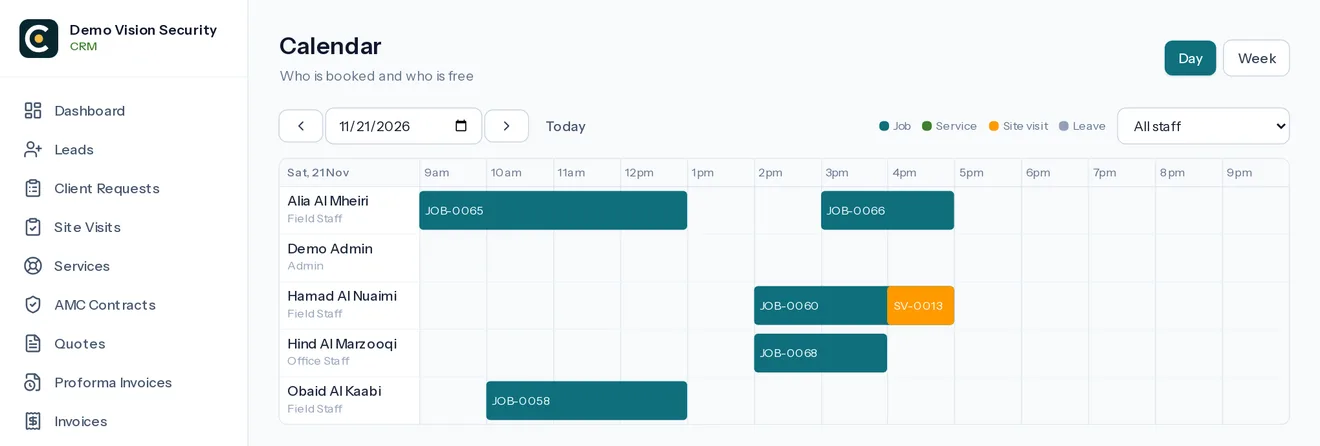
  • Day and week views for the whole team
  • Jobs, service calls, site visits and leave in one view
  • Avoid double-booking an installer
A day calendar with jobs and site visits across each employee

Do the work

Jobs that create themselves

Create a proforma, and the purchase and installation jobs are created for you. Follow each one through to sign-off.
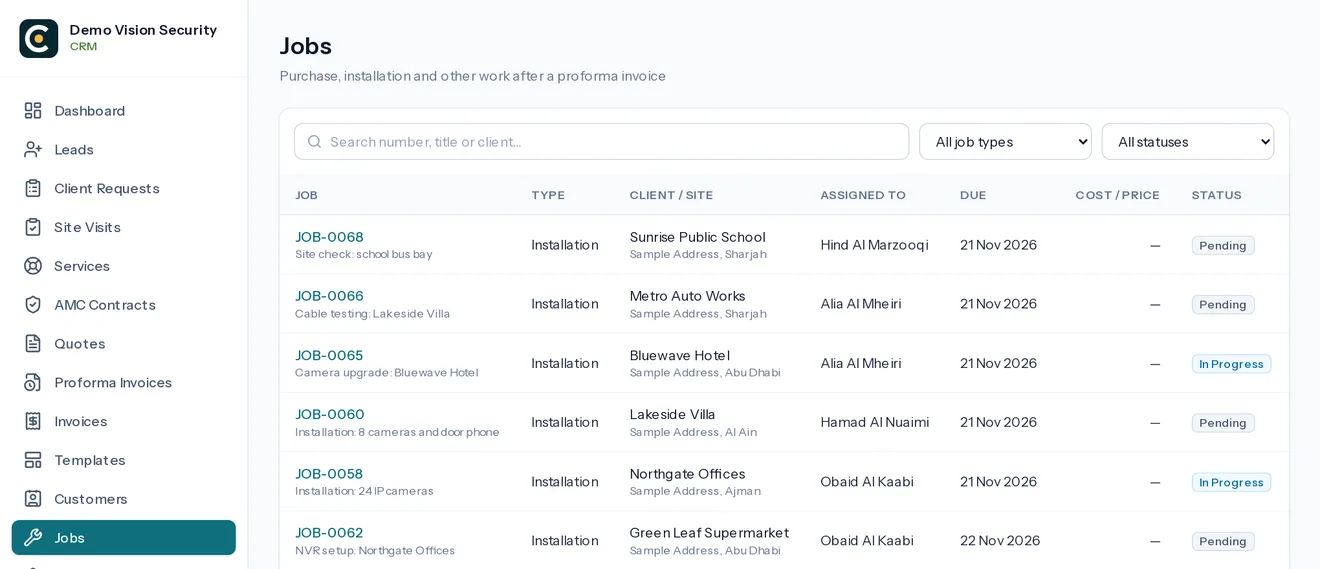
  • Assign each job to the right person
  • Follow every job from Pending to Approved
  • See site photos, costs and hours against the job
The jobs list, with type, client, assigned engineer, due date and status

Field team tracking

Know where your field staff are, and the hours they really worked

Installers and technicians spend the day at customer sites, and the office usually knows only what they say on the phone. CamVerion shows their attendance with location, the places they visited, the hours they spent on each job, and makes sure each person signs in only from their own phone. There is no separate GPS tracker to buy and nothing to install.
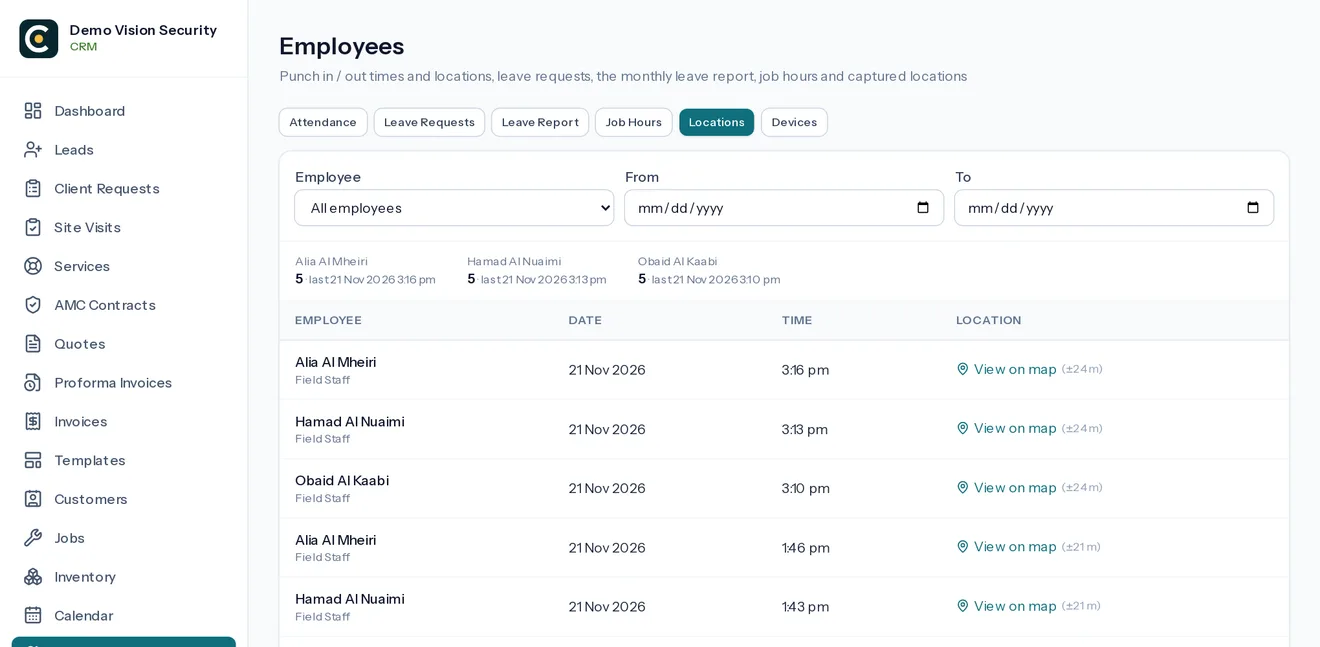
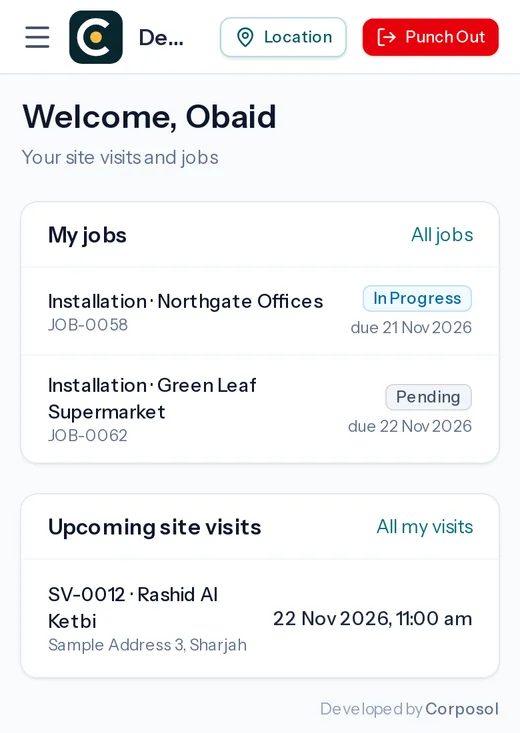
  • Capture Location

    Your field staff press Capture Location on their phone, and the office sees where they were and when on the Locations report. Ask them to capture it at every client, or every hour, so you can check visits at random instead of phoning around.
  • Punch in and out with location

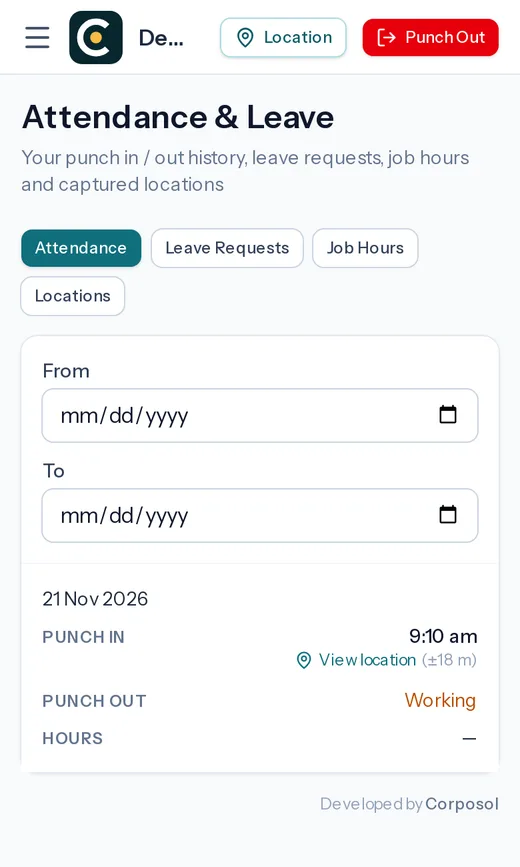
    Attendance starts with a punch in that records the time and place, and ends with a punch out. A forgotten punch out closes automatically at the end of the day, so the attendance report is ready for payroll.
  • Start Work and End Work on each job

    Pressing Start Work on a job or service call starts the clock and End Work stops it. Admins see the hours each person spent on each job, so you can price the next one properly and spot hours that were claimed but not worked.
  • Approve new device login

    Switch it on, and each person can sign in only from their one approved phone or computer. A login from any other device waits for the admin's approval, so logins are not shared and attendance is marked by the right person. Choose field staff only, or everyone except admins.
The Locations report, listing each field employee's captured locations with the time and a map link
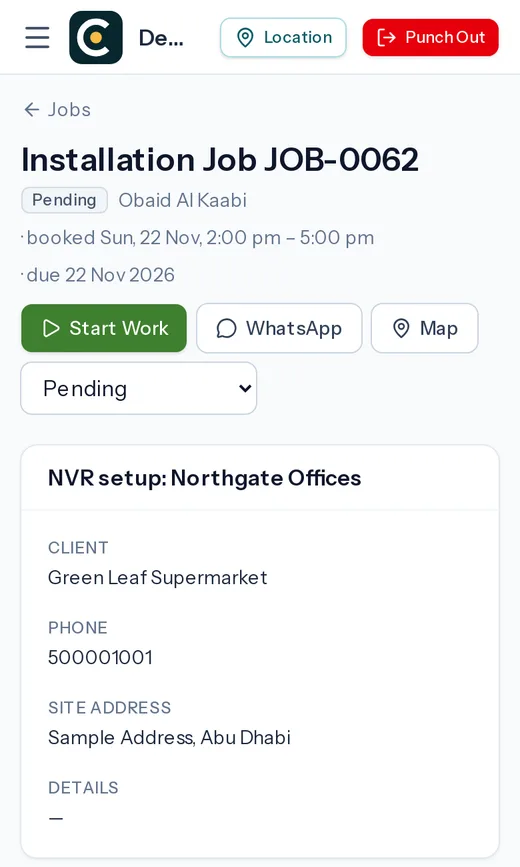
A technician's phone with the Location and Punch Out buttons above their jobs
A job on a technician's phone with the Start Work button
A technician's own attendance on a phone, with the punch-in location

Locations are taken only when staff punch or press Capture Location, never in the background. How field staff tracking works

Get paid

Know exactly who owes you what

Convert a proforma into an invoice without retyping it, record full and part payments, and see what is still pending.
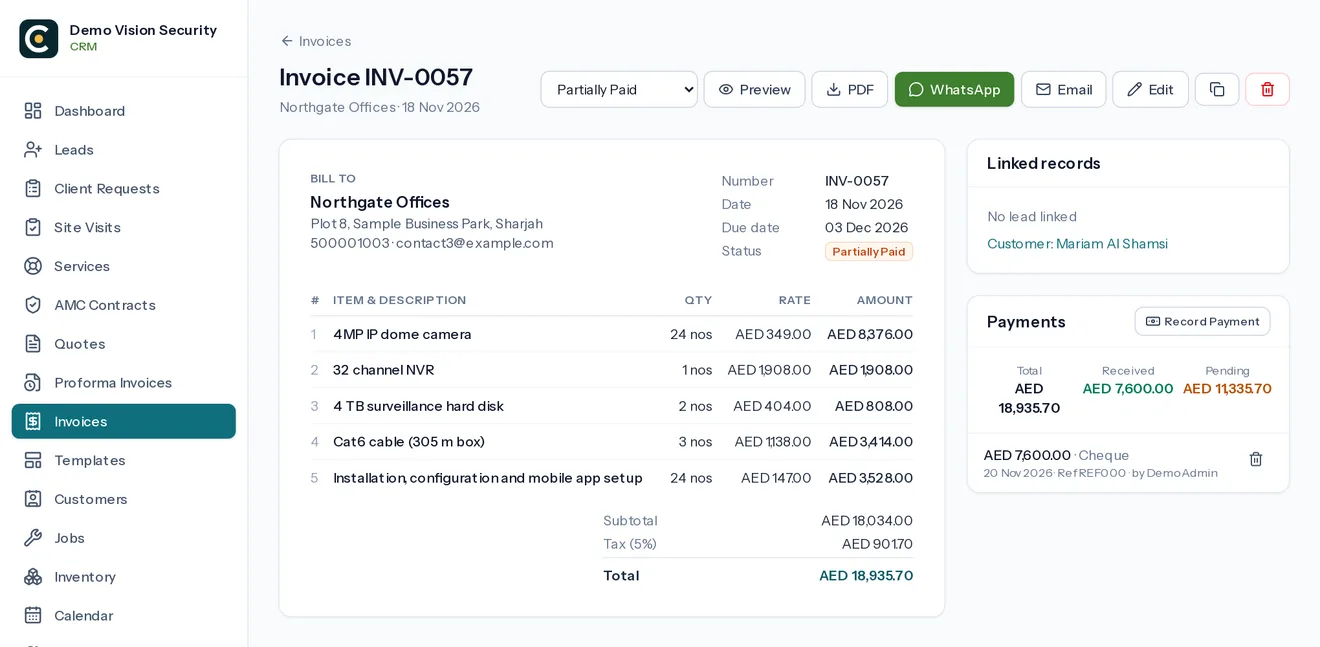
  • Numbers run in sequence with your own prefixes
  • Record payments by cash, card, cheque or transfer
  • 5% VAT and your TRN on quotes and invoices, in AED
An invoice with line items, tax and a record of payments received and pending

Look after customers

Service calls with a clear owner

Log the problem, let an engineer claim it, record the work and charges, then send the customer a receipt.
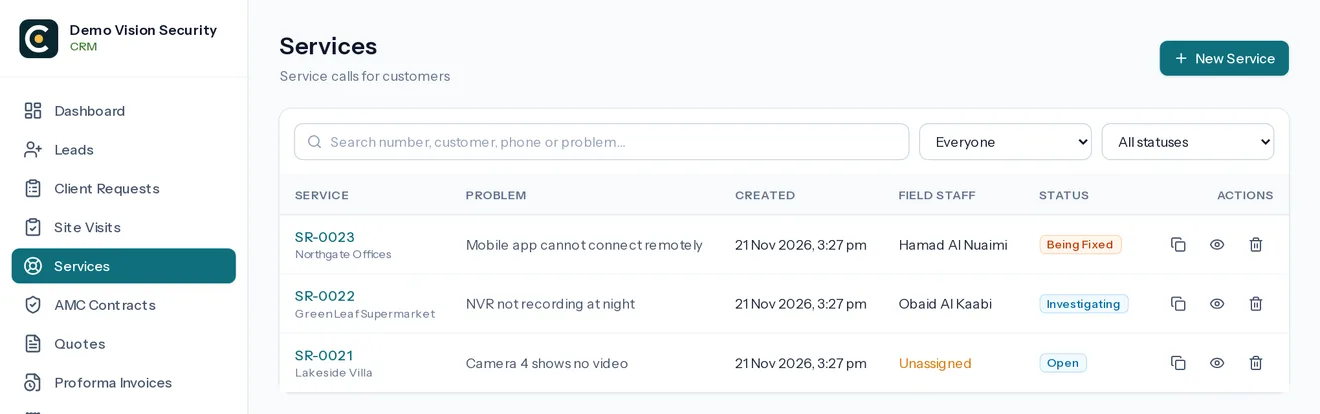
  • See who is working on each call
  • Follow it from Open through to Issue Resolved
  • Send a receipt when it is done
The service calls list, with problem, engineer and status

Enter it once. Use it everywhere.

The same details carry forward through every document, then go out however your customer prefers.

Quote Proforma Invoice
WhatsApp
Email
PDF
Secure link

Always know where things stand

Every job and service call moves through clear stages, so nobody has to ring round asking for an update.

Every job

  1. Pending
  2. In Progress
  3. Hold
  4. Completed
  5. Approved

Every service call

  1. Open
  2. Investigating
  3. Issue Traced
  4. Being Fixed
  5. Issue Resolved

All included, on every plan

No modules to add on. Plans differ only by how many people use the software.

See every feature, including client service requests, sending several documents at once and inventory

Your own account, your own data

Every company gets a private account with its own logo, document numbering, templates and WhatsApp number. Give each person the access their job needs.

Who can do whatAdminOffice staffField staff
Leads, customers and quotes Yes Yes –
Proformas and invoices Yes Yes –
Owner dashboard figures Yes Yes –
Site visits Yes Yes Assigned
Jobs and service calls Yes Yes Assigned
Attendance, leave and expenses Everyone Their own Their own
Approve proformas and finished jobs Yes – –
Company settings and logins Yes – –

Two ways to work with us

SaaS

Ready to use, with every feature included for a one-time setup fee and a monthly price based on your number of users. Your own private account, hosted and kept up to date by us.

See pricing

Customised software

If your business runs differently, we adapt the software to your process, documents and reports. Quoted per project once we understand what you need.

Tell us what you need

Run your next installation job from one place

Sign up with your company details and pay online. Your account opens as soon as you have paid, and you can add your team.

Request a demo

Leave your email and we will get in touch to set up a short demo.